Digital Sustainability
Reduce your website's carbon footprint and build an energy-efficient online presence.
Key takeaways
Switch between Plain English (essentials, no jargon) and Technical (specs, code, implementation) using the toggle above.
-
Images: Compress photos before uploading. Use tools like TinyPNG, Squoosh (for AVIF/WebP), or your CMS’s built-in optimization. Smaller images load faster and use less energy.
Image optimization: Serve WebP/AVIF with fallbacks. Use responsive images (
<picture>,srcset). Lazy-load below-the-fold images (loading="lazy"). Target <200KB total per page where possible. - Hosting: Some hosts run on renewable energy or have lower-carbon data centers. Check if your provider offers green hosting options. Green hosting: Choose providers with renewable energy commitments (e.g., Green Web Foundation certified). Consider regional data centers closer to your audience. Use CDNs to reduce origin load.
-
Video & fonts: Avoid auto-playing video. Use only the fonts you need. Each extra resource adds weight and energy use.
Asset diet: No autoplay video; prefer self-hosted or optimized embeds. Subset fonts; use
font-display: swap. Minify CSS/JS; remove unused code. Audit third-party scripts (analytics, ads) for impact. - Measure first: Use tools like Website Carbon Calculator or Ecograder to see your site’s footprint. Then prioritize the biggest wins. Measurement: Website Carbon Calculator, Ecograder, or GreenFrame for carbon estimates. Lighthouse for performance (LCP, FID, CLS). Core Web Vitals correlate with lower energy use. Track page weight and request count.
What does digital sustainability mean?
Digital sustainability is the practice of being aware that the internet has a real environmental impact and taking steps to reduce it. Every time someone visits a website, energy is consumed by the device loading the page, by the servers hosting the content, and by the network infrastructure delivering the data. All of that energy produces carbon emissions.
The internet as a whole is responsible for roughly 1.5 to 4 percent of global greenhouse gas emissions[1][3][4], comparable to the aviation industry. A 2024 joint report by the World Bank and ITU confirmed that at least 1.7 percent of global emissions stem from the ICT sector[1], though this is considered a conservative estimate due to a lack of regulated emissions reporting. In 2025, global data centers alone are expected to consume approximately 536 terawatt-hours of electricity, accounting for around 2 percent of total global electricity use[5], and that number could double by 2030.
The average web page produces approximately 0.36 grams of CO2 per page view[2]. That might sound small, but for a website receiving 10,000 monthly visits, that adds up to about 43 kilograms of CO2 per year. For high-traffic sites, those numbers scale quickly.
Being sustainable online means designing, building, and maintaining your website so it uses less energy, which means fewer carbon emissions and a smaller digital carbon footprint.
A sustainable website is a lighter, faster, and cleaner website.
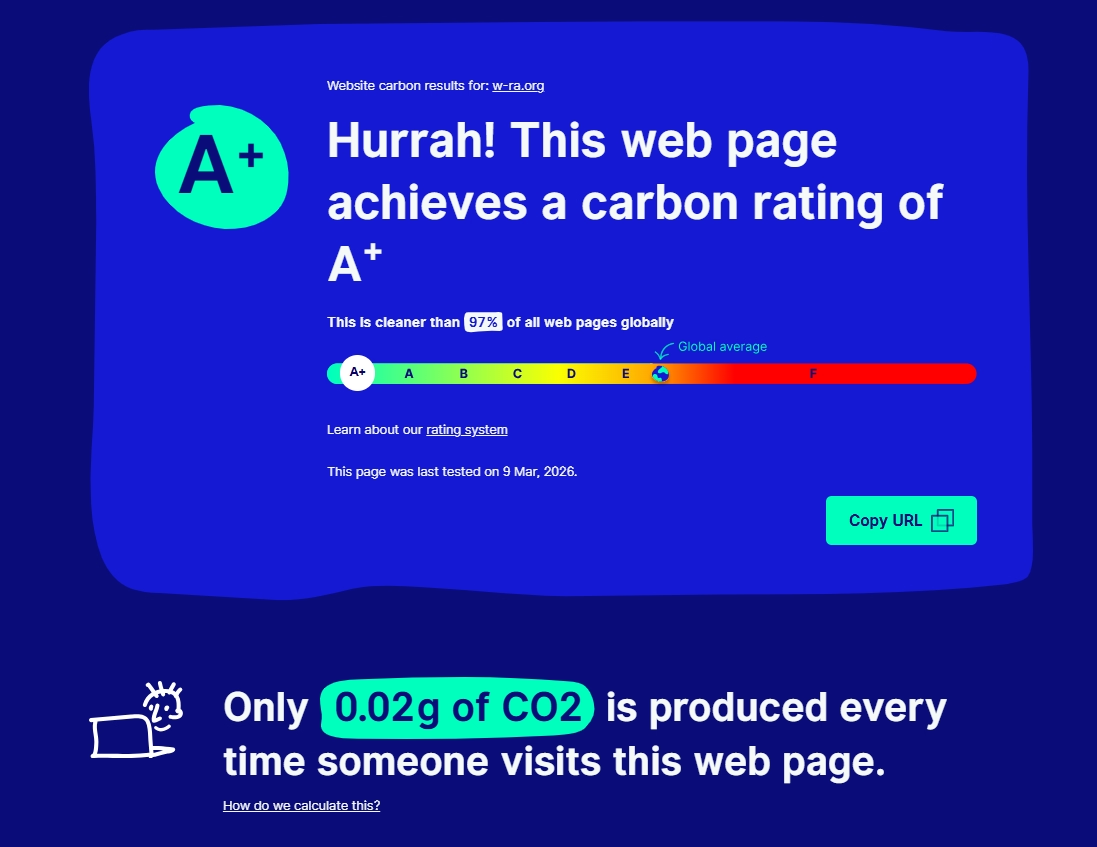
We scanned this site with the Website Carbon Calculator and achieved an A+ carbon rating—0.02g of CO2 per page visit, and cleaner than 97% of web pages globally. You can try it for your site too.
Why is being sustainable online important?
Environmental responsibility. Data centers consume enormous amounts of electricity, much of it generated from fossil fuels. Every unnecessary image, bloated script, and unoptimized page contributes to energy waste. As organizations committed to making the world better, nonprofits have both the opportunity and the responsibility to minimize this impact.
It aligns with your mission. If your nonprofit works in environmental advocacy, conservation, health, education, or social justice, a high-carbon website contradicts your messaging. Practicing digital sustainability means walking the talk.
Broader sector impact. The nonprofit sector collectively represents millions of websites. If even a fraction of those sites adopted sustainable practices, the cumulative effect on emissions would be significant.
It is also an equity issue. A lighter, faster website does not just help the planet. It helps people. Users in regions with slower internet connections, people on older devices, and communities with limited bandwidth all benefit when websites are more efficient.
What are the benefits of being sustainable online?
Reducing your digital carbon footprint delivers a range of benefits that go well beyond the environment.
Faster loading times
The same techniques that reduce carbon emissions (compressing images, minifying code, reducing third-party scripts) also make your website faster. A faster site means visitors do not get frustrated and leave before learning about your mission. Research from Google found that 53% of mobile site visits are abandoned if pages take longer than 3 seconds to load[6][29]. Nearly half (47%) of users expect a website to load in 2 seconds or less[7]. The BBC found that it loses 10% of its visitors for every additional second of page load time[8]. And sites that pass Google's Core Web Vitals thresholds see visitors 24% less likely to abandon during loading[9].
Better search engine rankings
Google and Bing use page speed and performance as ranking factors. The Core Web Vitals that Google measures (loading performance, interactivity, and visual stability) are all improved by sustainable web design practices. The average page load speed for a first-page Google search result is 1.65 seconds, and slow domains rank 3.7 percentage points worse on average than fast domains[30]. A faster, cleaner website ranks higher, which means more people find your organization.
Lower hosting costs
A lighter website uses less bandwidth and fewer server resources. That translates directly to lower hosting bills, something every nonprofit with a tight budget appreciates. On top of that, HubSpot research found that for every second of delay between 0 and 5 seconds, the conversion rate drops by 4.42%[31]. Speed saves both money and supporters.
Improved user experience
Clean, efficient design is not just green. It is better design. Removing unnecessary elements, using clear layouts, and prioritizing content over clutter makes websites easier to navigate and more pleasant to use.
Stronger brand credibility
Demonstrating your commitment to sustainability through your own digital presence builds trust. Donors, partners, and beneficiaries notice when your values are reflected in your actions.
Future-proofing
Environmental regulations are expanding to cover digital activity, particularly in the European Union. Organizations that act now will be ahead of the curve.
Easy techniques to be sustainable online
You do not need to be a developer to start reducing your website's carbon footprint. Here are practical, actionable techniques organized from easiest to more advanced.
For anyone (no technical skills needed)
Optimize your images. Images typically account for 60 to 70 percent of a web page's total file size[10]. Before uploading any image to your website, compress it. Free tools like TinyPNG, Squoosh (excellent for optimizing and converting to AVIF and WebP), and ShortPixel can reduce image file sizes by 70 percent or more without visible quality loss. Use JPEG for photographs and PNG for graphics with transparency. Better yet, use modern formats like WebP when your platform supports it.
Audit your content. Remove pages, blog posts, and media files that are outdated or no longer relevant. Every page on your website is stored on a server and uses energy when crawled by search engines, even if nobody visits it.
Limit embedded videos. Embedded video players, especially auto-playing ones, are among the most energy-intensive elements on any web page. Instead of embedding a full video, use a thumbnail image with a play button that loads the video only when clicked. This is sometimes called “lazy loading” for videos.
Reduce third-party scripts. Every social media widget, analytics tracker, chat plugin, and embedded tool adds external requests and increases your page's carbon footprint. Audit your plugins and remove any that are not essential. If you do not actively use a live chat tool, remove it. If you have multiple analytics scripts, consolidate to one.
Choose a green hosting provider. Your web host's energy source has a major impact. Hosting providers that run on renewable energy (solar, wind, hydro) can reduce server-related emissions by 80 to 90 percent[12]. Look for hosts that are members of the Green Web Foundation's directory. Popular green hosting options include GreenGeeks, A2 Hosting (with green initiatives), and Krystal.
Use fewer fonts. Every custom web font requires a file download. Stick to system fonts (like Arial, Georgia, or the device's default) whenever possible, or limit yourself to one or two custom font families. Each font family and weight you add increases page size.
For website managers and content editors
Enable caching. Caching tells browsers to store parts of your website locally on a visitor's device so they do not have to re-download everything on return visits. Most content management systems (like WordPress, Squarespace, or Wix) have caching settings or plugins. Popular WordPress caching plugins include WP Super Cache and W3 Total Cache.
Enable lazy loading. Lazy loading means images and media below the visible area of the page do not load until the user scrolls down to them. This can significantly reduce the amount of data transferred on initial page load. Many modern website builders support this natively.
Minify your CSS and JavaScript. Minification removes unnecessary spaces, comments, and characters from your code files, typically reducing their size by 20 to 30 percent[11]. WordPress plugins like Autoptimize or WP Rocket can handle this automatically.
Use a Content Delivery Network (CDN). A CDN distributes copies of your website across servers around the world, so visitors load content from a server geographically close to them. This reduces the distance data travels, cutting energy use and improving speed. Popular CDN options include Cloudflare (which has a free tier) and BunnyCDN.
Set image dimensions. Always specify the width and height of images in your code or CMS. This prevents layout shifts (which waste processing power re-rendering the page) and helps the browser allocate space efficiently.
For web developers
Use modern image formats. Serve images in WebP or AVIF format with JPEG/PNG fallbacks for older browsers. These formats offer superior compression while maintaining quality, typically reducing file sizes by 25 to 50 percent compared to traditional formats.
Minimize HTTP requests. Combine CSS files, inline critical CSS, defer non-essential JavaScript, and use CSS sprites for icons. Every HTTP request adds overhead and energy consumption.
Implement efficient caching headers. Set appropriate Cache-Control and Expires headers for static assets. Properly configured headers prevent redundant resource loading and reduce server requests for returning visitors.
Use responsive images. Serve different image sizes for different screen widths using the <picture> element or srcset attribute. A user on a mobile phone should not have to download a 2000-pixel-wide hero image.
Audit third-party scripts ruthlessly. Every external script (tracking pixels, social widgets, external fonts, A/B testing tools) generates additional HTTP requests and increases page weight. Use a tool like WebPageTest to identify and evaluate every third-party resource.
Consider static site generation. Static sites (built with tools like Hugo, Eleventy, or Next.js with static export) serve pre-built HTML files instead of generating pages dynamically on each request. This eliminates database queries and server-side processing, which significantly reduces energy consumption per page view.
Write efficient code. Avoid unnecessary JavaScript, reduce DOM complexity, and use CSS animations instead of JavaScript-driven animations where possible. Efficient code means less processing power needed on both the server and the user's device.
Tools to measure your website's carbon footprint
Several free tools help you understand and reduce your digital environmental impact.
Website Carbon Calculator
Website: websitecarbon.com
Best for: Quick, easy-to-understand carbon estimates
Enter any URL and get an immediate estimate of the CO2 produced per page view. The tool also tells you whether your site is hosted on green energy and compares your results to other websites tested. It is the simplest starting point and requires zero technical knowledge.
Ecograder
Website: ecograder.com
Best for: In-depth analysis with actionable recommendations
Ecograder evaluates your website across multiple sustainability dimensions: page weight, hosting, user experience, and design efficiency. It provides a score along with specific improvement suggestions broken into categories so you can prioritize the changes that will have the greatest impact.
BetterWeb.eco
Website: betterweb.eco
Best for: Sustainability assessment with broader context
BetterWeb evaluates your website against sustainability criteria and provides a rating. It focuses on overall web health including sustainability factors.
Beacon
Website: digitalbeacon.co
Best for: Comprehensive sustainability auditing
Beacon scans your website and provides a detailed sustainability report covering carbon emissions, performance metrics, and accessibility considerations. It provides per-page analysis and allows you to track improvements over time.
GTmetrix
Website: gtmetrix.com
Best for: Web performance analysis (which indirectly reduces carbon)
GTmetrix analyzes your page speed and performance using Google's Lighthouse and Web Vitals metrics. While it does not measure carbon directly, every performance improvement it suggests will also reduce your carbon footprint.
Squoosh
Website: squoosh.app
Best for: Image optimization and conversion to AVIF/WebP
Squoosh is a free, browser-based image converter and optimizer from Google Chrome Labs. Drag and drop images to compress them or convert to modern formats like WebP and AVIF, which typically reduce file sizes by 25 to 50 percent. All processing happens locally in your browser, so your images never leave your device.
CO2.js by Green Web Foundation
Website: developers.thegreenwebfoundation.org
Best for: Developers who want to integrate carbon calculations into their workflows
CO2.js is an open-source JavaScript library that lets you calculate the carbon emissions of data transfer programmatically. You can integrate it into your build process, monitoring tools, or custom dashboards.
Google PageSpeed Insights
Website: pagespeed.web.dev
Best for: Understanding Core Web Vitals and performance
Enter a URL and receive a detailed performance report based on real user data and lab analysis. Improving the metrics it measures will directly reduce your site's energy consumption. It is free, authoritative, and provides clear recommendations.
Green Web Foundation Directory
Website: thegreenwebfoundation.org
Best for: Checking if your hosting provider uses renewable energy
Enter a URL or hosting provider and the tool checks its database to tell you whether the server is powered by green energy.
How Oasis of Change can help
At Oasis of Change, we specialize in helping nonprofits reduce their website carbon footprints. We have achieved up to 98% emission reductions for our clients through comprehensive optimization. If you want hands-on support or a professional sustainability audit for your website, visit oasisofchange.org to learn more about our services.
Sources
[1] World Bank and ITU, “Measuring the Emissions & Energy Footprint of the ICT Sector,” 2024. itu.int. Estimates range from 1.5% to 4% of global greenhouse gas emissions.
[2] Website Carbon Calculator methodology. websitecarbon.com. Based on data transfer estimates and global energy grid averages.
[3] myclimate, “What is a digital carbon footprint?” myclimate.org. Estimates the ICT sector is responsible for around 1.5 to 4% of global greenhouse gas emissions.
[4] World Economic Forum, “A guide to your digital carbon footprint.” weforum.org. Studies estimate digital technologies contribute between 1.4% to 5.9% of global GHG emissions.
[5] EcoMatcher, “The Climate Cost of Internet Data,” 2025. ecomatcher.com. In 2025, global data centers are expected to consume approximately 536 terawatt-hours of electricity.
[6] Google, “The Need for Mobile Speed.” thinkwithgoogle.com. 53% of mobile site visits are abandoned if pages take longer than 3 seconds to load.
[7] Hostinger, “Website load time statistics.” hostinger.com. 47% of users expect a website to load in two seconds or less.
[8] SiteBuilder Report, “Website Speed Statistics.” sitebuilderreport.com. BBC’s website loses 10% of its visitors for every additional second of load time (BBC, 2018).
[9] Google, “The business impact of Core Web Vitals.” web.dev. Sites that pass Core Web Vitals thresholds see visitors 24% less likely to abandon during loading.
[10] Digidop, “How to Measure and Reduce the Carbon Footprint of Your Website.” digidop.com. Unoptimized images typically account for 60 to 70% of total page weight.
[11] Digidop, “How to Measure and Reduce the Carbon Footprint of Your Website.” digidop.com. Code minification can reduce file sizes by 20 to 30%.
[12] Digidop, “How to Measure and Reduce the Carbon Footprint of Your Website.” digidop.com. Green hosting can reduce server-related emissions by 80 to 90%.
[29] Google, “Think with Google,” 2016. thinkwithgoogle.com. 53% of mobile users abandon sites that take over 3 seconds to load.
[30] Hostinger, “Website load time statistics.” hostinger.com. Average page load time is 2.5 seconds on desktop and 8.6 seconds on mobile.
[31] SiteBuilder Report, “Website Speed Statistics.” sitebuilderreport.com. For every second of delay between 0 and 5 seconds, the conversion rate drops by 4.42% (HubSpot research).